AI bookkeeping for small businesses
The last bookkeeper
you'll ever need.
Your books done the same day and kept up to date every day. Everything a bookkeeper does, for a fraction of the price.
Free to join. The first 1,000 businesses in get their catch-up free.
Keep QuickBooks.
We'll keep it up to date.
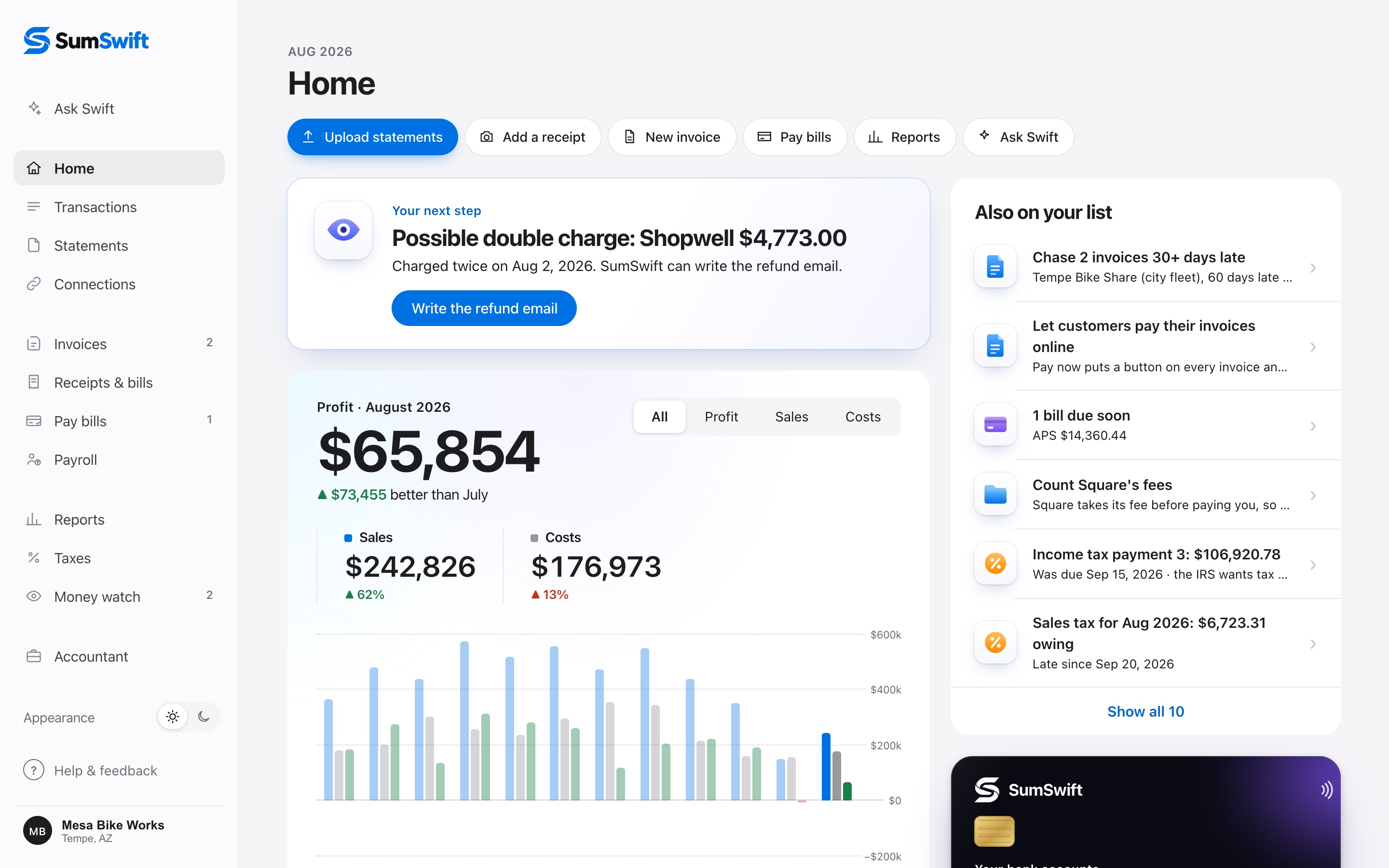
SumSwift writes every transaction into your QuickBooks Online, sorted, matched and with its receipt attached. You and your accountant keep working where you always have.
Synced 2 minutes ago · 412 transactions, every receipt attached
Your inbox is full of write-offs you never counted.
Connect Gmail and SumSwift finds every receipt in your inbox, reads it and matches it to its purchase.
4 new from your email
Receipts & bills
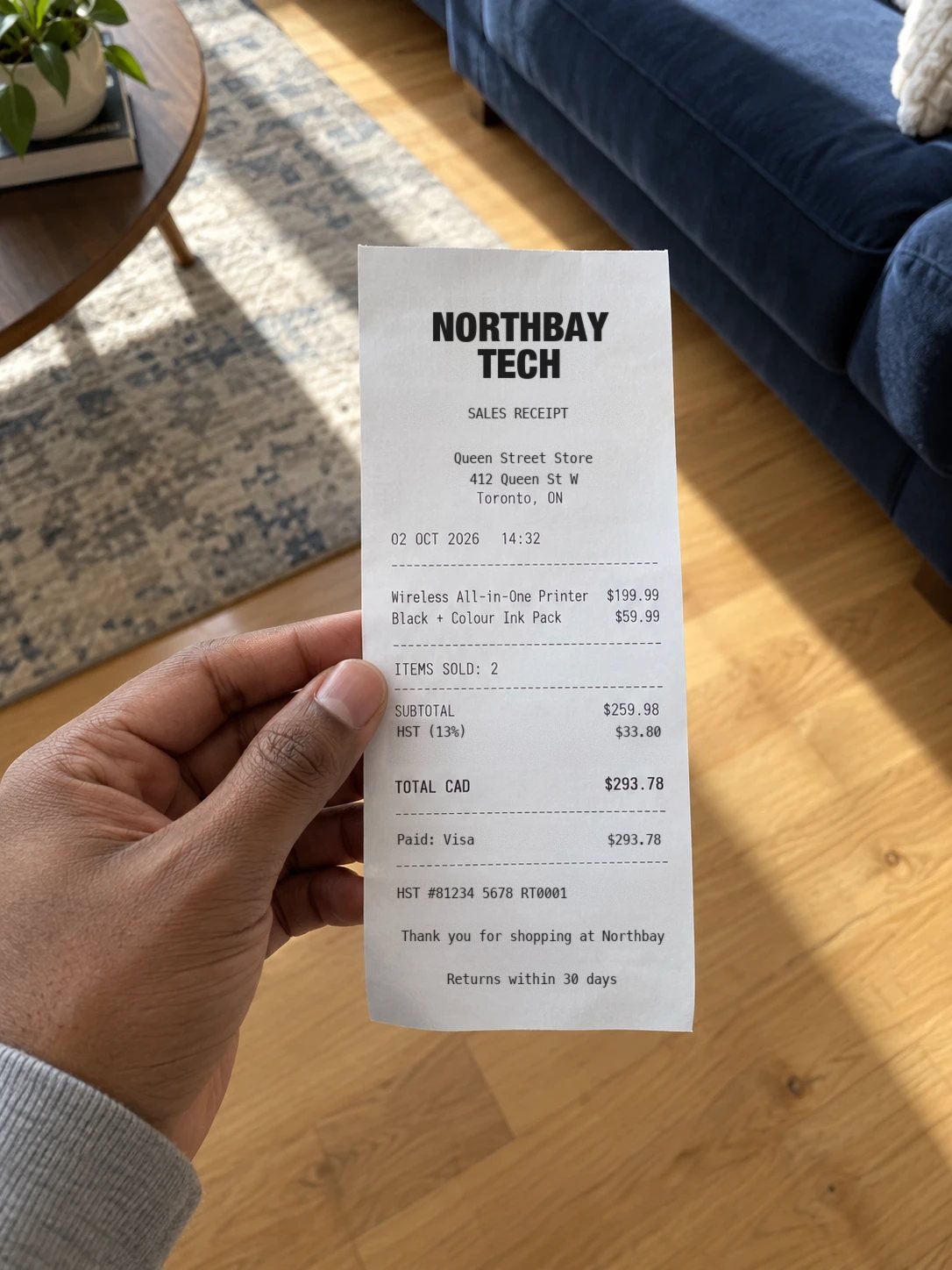
What SumSwift read
No more digging at tax time.
Every receipt and bill since January is found, read and filed for you. Nothing to search for, print or forward.
Every write-off counted.
Online receipts are where write-offs get lost. SumSwift reads each one and matches it to its purchase, so it's counted.
Backed up if the IRS asks.
Each purchase is matched to its receipt and kept with your books, ready for your accountant or a review.
It keeps going on its own.
SumSwift checks your inbox every day, so new receipts and bills show up without you lifting a finger.
Read only: SumSwift never sends, changes or deletes your email. Outlook is coming soon.
More than a bookkeeper.
For a lot less.
It only asks what it can't know.
Everything else is sorted for you. One answer covers every charge from the same place.
How it sortsTaxes, ready before you ask.
Your quarterly estimated tax worked out, with the due date and what to pay.
Taxes in SumSwiftMoney you'd never find.
Double charges caught with the refund email written, and every price that went up.
Money watchGet paid faster.
Invoices with your logo that remind late customers and mark themselves paid.
InvoicesYour accountant gets everything.
Free access, and every report, receipt and statement for the year in one download.
For accountantsSafe as your bank.
Encrypted and private. Read only, never used to train AI, and yours to delete.
How we keep it safeComing soon
Bill pay and hands-off payroll.
Coming to SumSwift.
Payroll, done for you. Your team paid and the taxes sent and filed, without the bank file.
Pay bills. Pick the bills and the day, by bank transfer or a mailed cheque.
The work of a bookkeeper.
A fraction of the price.
| What you get | A typical bookkeeper | SumSwift |
|---|---|---|
| Every transaction categorized | By hand | Yes, in minutes |
| Every account reconciled | Monthly | Every upload, to the cent |
| Your books ready | Weeks after month end | The day you upload |
| Receipts, bills and invoices | Often extra | Included |
| Sales tax and quarterly estimates | Often extra | Included |
| Year-end package for your accountant | Yes | Yes, one download |
| Price | Often several hundred a month | $79 a month |
Pricing.
Monthly covers the month you join and the 2 before. Further behind? That's a catch-up.
Ongoing
Monthly
$79/mo
USD. Cancel anytime.
- Books done the day you upload
- Every account matched to your bank
- Receipts, invoices and sales tax
- Up to 3 accounts, $10/mo each extra
If you're behind
Catch-up
$599 once
USD. Extra years back $299 each.
- The 12 months before Monthly covers
- Done in minutes, not weeks
- A final profit report for your accountant
- Your first month of Monthly free
Money back if it's not right. If your books aren't right, we'll refund your first month. More than 3 accounts or 4 years? Get a quote.
Questions.
What if it isn't right for me?
Pick a plan, upload your statements, and your books are done in minutes: every transaction sorted, checked against your bank and summed up in plain English. If your books aren't right, we'll refund your first month. Just tell us.
What do I need to send?
Your statements for each account, for the months you need done. PDFs downloaded from online banking are best, and zips, CSV, Excel and Quicken downloads work too. Our statement guide shows where to find them at your bank. We don't need your bank login.
How can it be this fast?
A human bookkeeper reads every line of every statement by hand, which is why it takes weeks. We use AI to read and categorize your transactions, then check every account against your bank's own balances, so your books are done in minutes. The only wait is for you to confirm the few transactions we flag.
Can SumSwift replace my bookkeeper?
For many businesses, yes: categorizing and reconciling every account, receipts, bills, invoices, sales tax tracking, month-end close and the year-end package for your accountant. Payroll too: SumSwift works out each payday, makes your bank's direct deposit file and books it, and you send the money from your own bank. What we don't do yet: run payroll for you through a partner or pay bills for you (both coming soon), or file your tax returns.
Can SumSwift find money I missed in past years?
Often, yes. It checks the years already filed for costs that were never counted, equipment that was never depreciated and loan interest that was missed, and it flags things the IRS could question, like personal spending counted as business. Each one shows roughly what it's worth. Your CPA makes the changes; SumSwift never files or amends anything.
Could an AI pay a fake invoice?
No. SumSwift never pays anything on its own, and every bill is checked before it can be paid. It's held back if it's from a supplier you've never paid, if the name is a letter off one you know, if the invoice number was already paid, if it's dated months back, if it's far more than usual, or if it came from a new email address. You click "It's real" and it can be paid.
I use QuickBooks. Can I switch?
Yes. Export your General Ledger and Chart of Accounts from QuickBooks (it takes a minute) and SumSwift brings your history across, checked against QuickBooks' own balances, with your categories. And you can export back to QuickBooks any time.
Can my accountant see my books?
Yes, free. Give them access from your account: to look, or to make fixes too. They can download your reports, the year-end package and a QuickBooks export. Anything they change is on the record under their name, and you can remove them any time. Someone at your business can help too, as staff, without seeing your taxes or payroll.
Is my financial data safe?
Statements are stored encrypted and only used to do your books. We use Claude, an AI model made by Anthropic, to read statements and sort transactions, and Anthropic does not train its models on that data. You can delete your account and every file yourself, any time.
How does Monthly work?
It covers the month you join and the 2 before it (join by March 31 and that's this year from January), then every month after: upload your statements, and your books are done the same day. On the 1st we email you which statements are still needed. Lock each month in one click. It's $79 USD a month for up to 3 accounts, plus $10 a month for each extra account, and you can cancel anytime. Or pay $790 USD once a year (2 months free, $100 a year for each extra account).
What's the difference between Monthly and a catch-up?
Monthly covers the month you join and the 2 before it, then every month you stay, with everything kept for good. Join by March 31 and that's this year from January. A catch-up is for books nobody did before that: the 12 months before, once, for $599, and $299 for each extra year back, up to 4 years. Cancel and come back later, and the months in between are a catch-up too. Switching from QuickBooks or a bookkeeper is free on Monthly, however far back your books go.
I'm months behind. Where do I start?
If it's the last couple of months, Monthly covers it. Further behind, a catch-up: $599 USD one time for up to 12 months and 3 accounts, and $299 for each extra year back, up to 4 years. Upload everything at once, your books are done in minutes, you check anything we flag, and your final profit report is ready to download. Your first month of Monthly is free after that. More than 4 years or 3 accounts? Get a quote.
Do you do my taxes?
No. We're bookkeepers, not accountants. We work out your quarterly estimated tax and sales tax, track 1099s, and give your CPA or tax preparer clean books and a Schedule C to file from.
I mix personal and business spending. Is that a problem?
Very common. Personal spending on a business account is marked personal so it stays off your profit, and a personal card or account you sometimes use for business can be marked personal too, so only the business things count. You can change anything we got wrong.
I did my own books and they're a mess. Can you fix them?
Yes. SumSwift rebuilds your books from your bank statements, which are always right. Add your old QuickBooks and SumSwift shows, line by line, what was wrong, what your profit really was, and which past tax returns your accountant may need to correct.
Does SumSwift work in every state?
Yes, all 50 states and DC. Your state's income tax is built into the estimate. Sales tax works for businesses that collect in one state; selling into several states isn't supported yet.
Do you handle 1099s?
SumSwift finds everyone you paid enough to need a 1099, tracks whose W-9 you have, and gives you the list to file. It doesn't e-file them for you yet.
Not sure where to start?
Tell us about your business. We'll reply by email.